Shopify Inbox vs AskAngle and Remark: when better chat earns the upgrade
Where AskAngle, Remark, Gorgias and Tidio can shine beyond Shopify Inbox: storefront design, guided buying, integrations and a fair upgrade test.

You chose the typeface. Reshot the products. Reworked the mobile navigation. Then a generic chat bubble appears over the add-to-cart button, opens a cramped panel and asks for an email address before it offers help. The storefront suddenly feels like two different businesses.
That is why chatbot design deserves a place in the buying decision. A shopping assistant occupies the same screen as your products, pricing and checkout. Its questions, recommendations and mistakes become part of the customer’s impression of the store. Treating it as a cheap utility in the corner is an expensive way to think about the experience.
Start with what Shopify Inbox actually does now
Shopify Inbox is listed as free in the Shopify App Store. Its current feature set includes an optional AI agent, catalogue connections, brand-voice controls and conversation analytics. The native option deserves a real trial before another subscription enters the stack. Shopify Inbox — current App Store listing ↗
Shopify’s documentation says its Inbox agent can answer automatically using catalogue information, store policies, Knowledge Base material and published store content. It also describes personalised product recommendations when customers sign in with Shop. This is a different capability from AI-generated drafts that help staff compose replies. Shopify — Inbox and its optional agent ↗
Inbox also lets merchants adjust the chat button and greeting in the theme editor. So “it has AI” and “you can change the colours” are weak reasons to buy an alternative. The stronger reason is that another tool handles a specific, important journey better in your store. Shopify — chat settings and appearance ↗
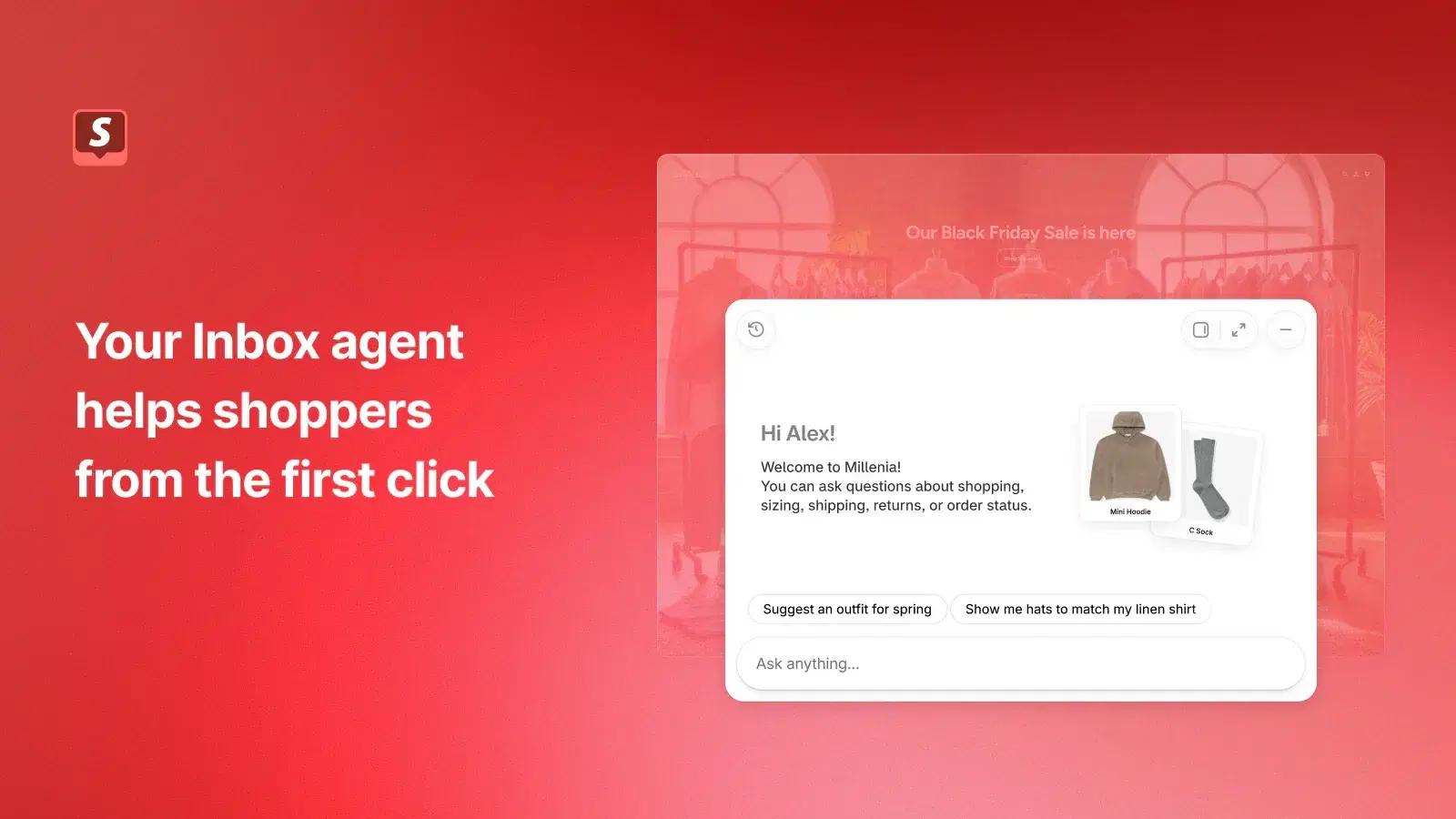
Shopify Inbox already looks like a shopping assistant
Shopify’s current App Store gallery shows its agent opening with suggested buying questions and product context on the storefront. The comparison therefore starts above a basic chat box.
WHAT TO NOTICETest the configured native experience first. A paid tool needs to make the choice, action or handoff materially clearer.
Official image: Shopify / Shopify App Store ↗Where a third-party assistant can earn its place
| What you need | Native baseline | What an alternative must prove |
|---|---|---|
| Storefront fit | Configure Inbox in your own theme first. | Clearer entry points, more usable mobile conversations or styling that better fits the brand. |
| Guided product choice | Test the optional Inbox agent against real buying questions. | Better clarifying questions, more relevant shortlists and more accurate handling of the same catalogue. |
| From advice to purchase | Record the current product and cart journey. | A clearer, reliable path from recommendation to the correct variant and cart. Remark documents conversation-based cart actions. |
| Service operations | Review how your team handles Inbox conversations. | The handoffs and integrations your existing support stack requires. Test Gorgias or Tidio against that workflow. |
| Commercial value | Include the native option in your trial. | A measurable benefit worth the additional cost and maintenance. |
These are our evaluation criteria, not claims that Inbox fails every row. If a specialist improves the moments that matter to your customers, that is where it can shine. If it merely answers the same questions inside a more expensive box, the upgrade has not earned its place.
What clean design actually buys you
Our view: a carefully designed assistant has more room to make a useful contribution than a poorly integrated alternative, because it removes friction from asking, choosing and acting. That is a mechanism worth testing, not a promise that attractive interfaces always convert better. A low-cost tool can be excellent; a costly one can still interrupt the sale.
| Moment | What good looks like | What to test |
|---|---|---|
| Finding help | An unobtrusive entry point with a clear purpose | Can a shopper find help without losing the product or cart controls? |
| Starting | A few relevant prompts and a visible text input | Can they ask their own question immediately? |
| Reading | Short, well-spaced answers with useful product context | Is the important detail visible without a wall of text? |
| Choosing | Accurate product cards and an understandable next step | Do links preserve the right item, variant and market? |
| Getting unstuck | A clear way to close, recover or reach a person | Does the next person receive the conversation context? |
Clean does not mean empty. A shopper comparing two rugs may need dimensions, material, care requirements and a reason one suits the room. The interface should organise those facts. It should not replace them with three vague sentences and an enthusiastic emoji.
AskAngle: study the assistant as a sales associate
Angle, at askangle.com, positions its product around guided shopping. Its site describes catalogue and policy-based answers, theme adaptation, a configurable brand voice and a merchant inbox for reviewing conversations. Those are relevant ingredients when the brief is to help someone choose, rather than simply deflect a support ticket. Angle — product, setup and brand-voice information ↗
Our evaluation would start with a real buying question: “I need a bag for a 16-inch laptop and a daily cycle commute.” Look for a clarifying question where needed, a small relevant shortlist and an explanation grounded in the actual products. Then ask about an unavailable colour or an unsupported compatibility claim. The polished experience has to survive uncertainty.
Inspect how the widget fits your own theme on a small phone. Matching colours is only the first step: spacing, product imagery, type size, keyboard behaviour and the route back to the product all matter. AskAngle is a candidate to evaluate on that complete journey, not a winner declared from its marketing page.
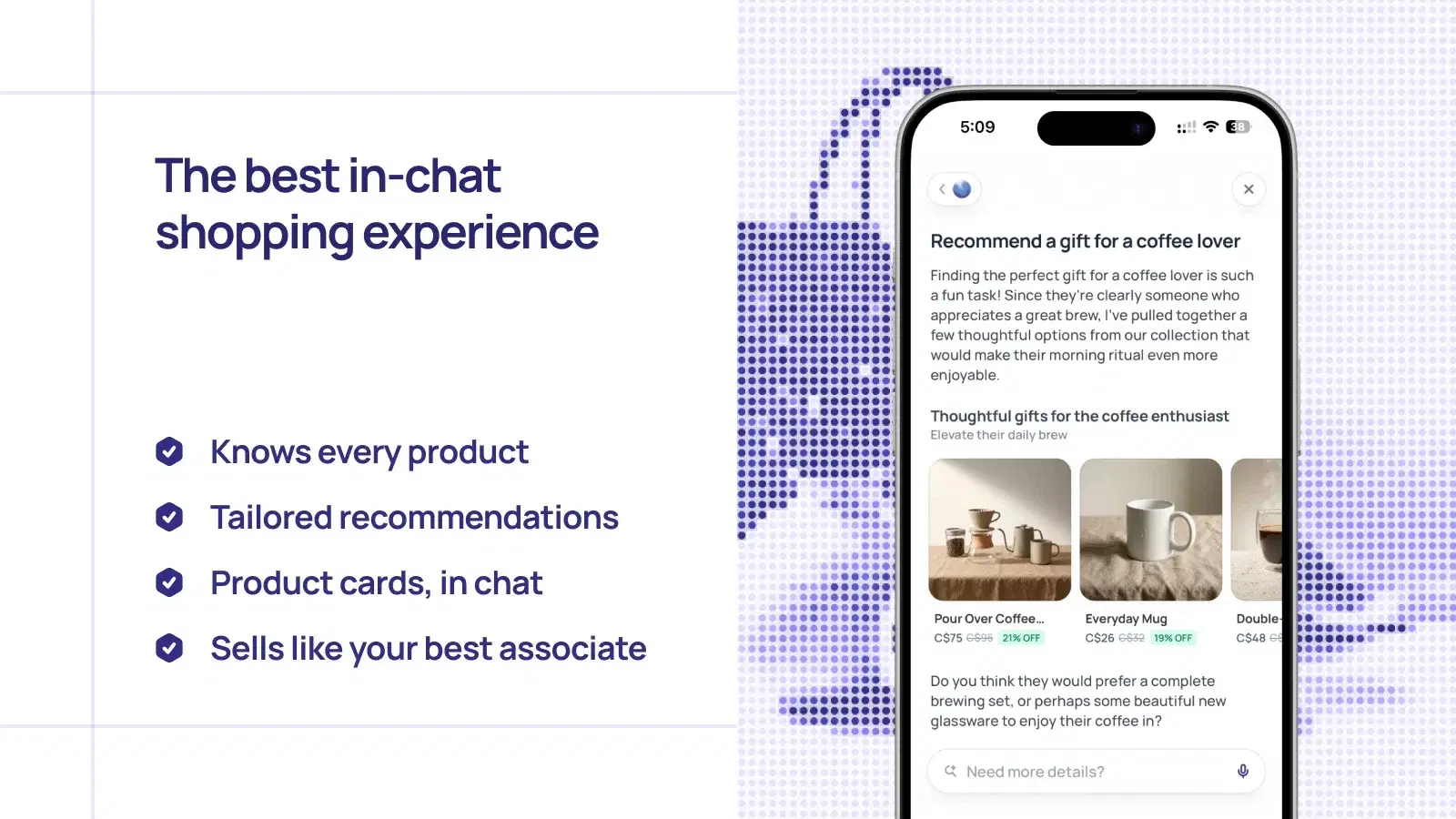
Recommendations should feel shoppable inside the answer
Angle’s official gallery shows a gift question answered with a compact shortlist of product cards. This is the interaction to inspect: the reasoning stays beside the items instead of sending the shopper back to a catalogue grid.
WHAT TO NOTICEAsk whether the shortlist is relevant, whether each card carries enough context and whether the correct product and variant survive the next tap.
Official image: Angle / Shopify App Store ↗Remark: pay attention to the moments around the answer
Remark’s January 2026 widget redesign describes a lighter layout, pre-populated questions, clearer conversation entry points and controls for matching the widget to a brand. Its May 2026 Shopify update also describes cart management and a route to checkout within the conversation. Both changes concern the experience around the answer, not just the words the model produces. Remark — redesigned chat widget ↗
For a Remark trial, begin at a product page, ask a specific buying question, inspect the recommendation and follow the cart action. Check the selected variant, quantity and price at each step. Decide which actions require the shopper’s explicit choice. A shorter route is useful only when it remains understandable and accurate. Remark — Checkout from Chat for Shopify ↗
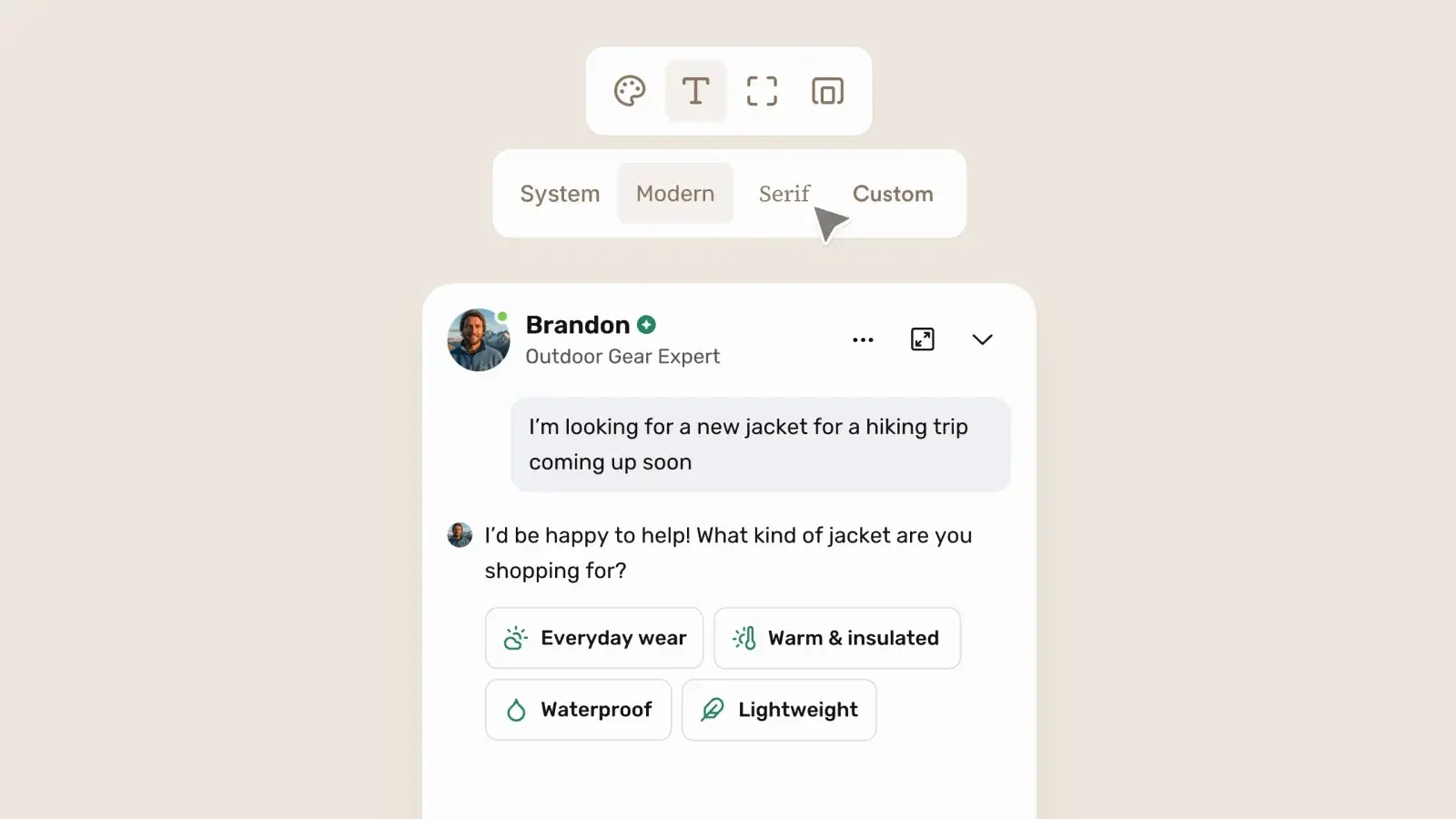
The interface is part of the brand system
Remark’s redesign demo treats typography, tone and starter replies as configurable parts of the storefront. The useful lesson is broader than colour matching: the first interaction should look deliberate and give the shopper a specific place to begin.
WHAT TO NOTICECheck type, spacing and prompts on the real theme at phone size. Visual polish only counts if the conversation remains readable and easy to exit.
Official image: Remark ↗Two more candidates worth a proper look
Gorgias is worth including when buying advice must fit an existing customer-service operation. Its Shopping Assistant documentation describes drawing on the Shopify catalogue, store website and additional product information. Evaluate the shopping experience together with what happens when the conversation becomes a delivery issue, a return or a request for a person. Check the exact AI Agent entitlement for your account. Gorgias — Shopping Assistant explained ↗
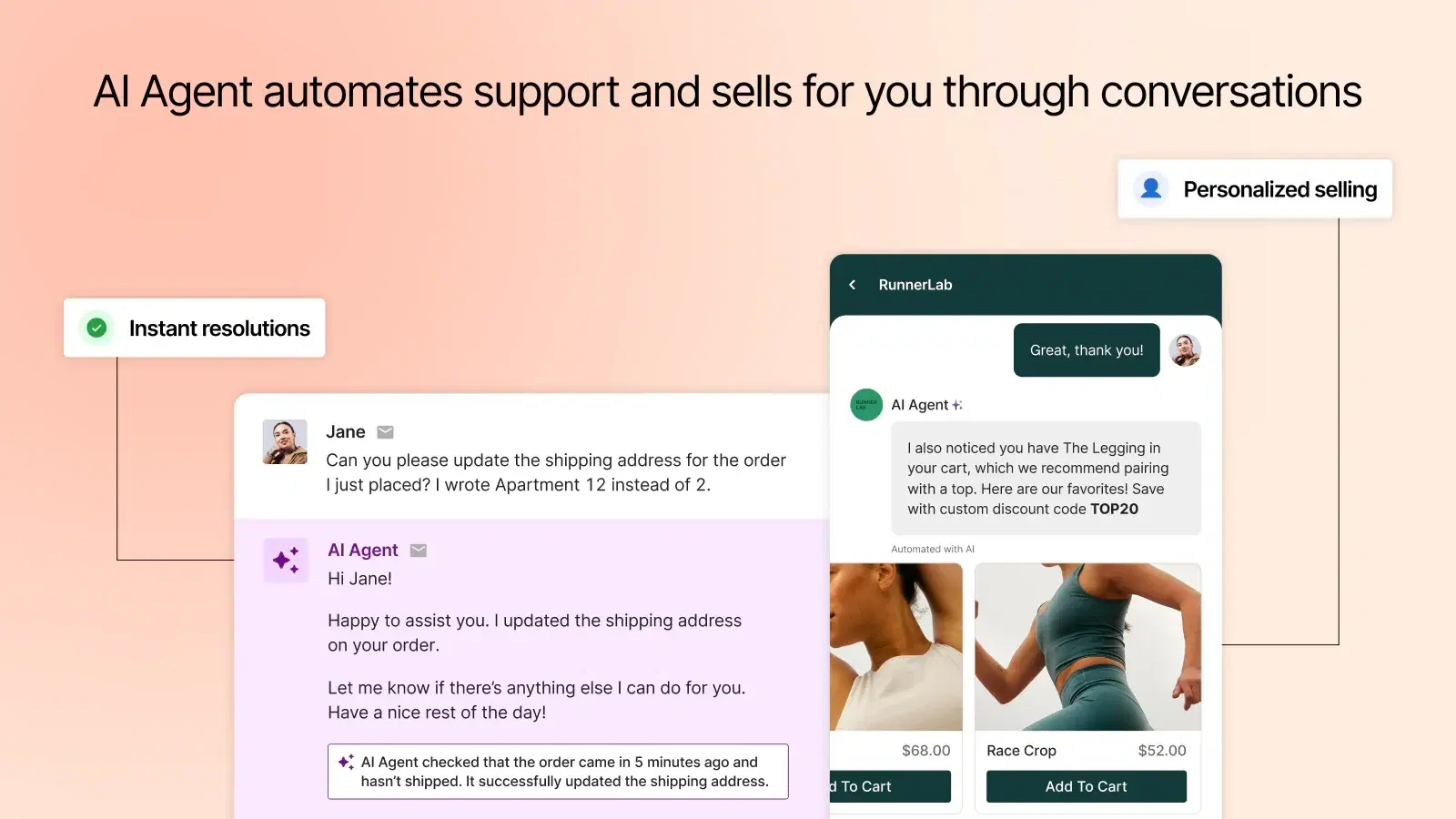
A conversation can cross from advice into service
Gorgias’s official gallery puts an address change and a product recommendation in the same frame. It illustrates why the surrounding support operation matters: the assistant needs authority boundaries, order context and a visible record of what it changed.
WHAT TO NOTICETest which actions are automatic, which require approval and what a colleague sees when the conversation becomes an exception.
Official image: Gorgias / Shopify App Store ↗Tidio’s Lyro documentation describes product recommendations, brand guidance and configurable handoff rules. Include it when you want to compare conversational help and human support together. Give it the same product questions and exceptions as the other candidates, then review the mobile panel and the complete handoff thread. Tidio — Lyro AI Agent ↗
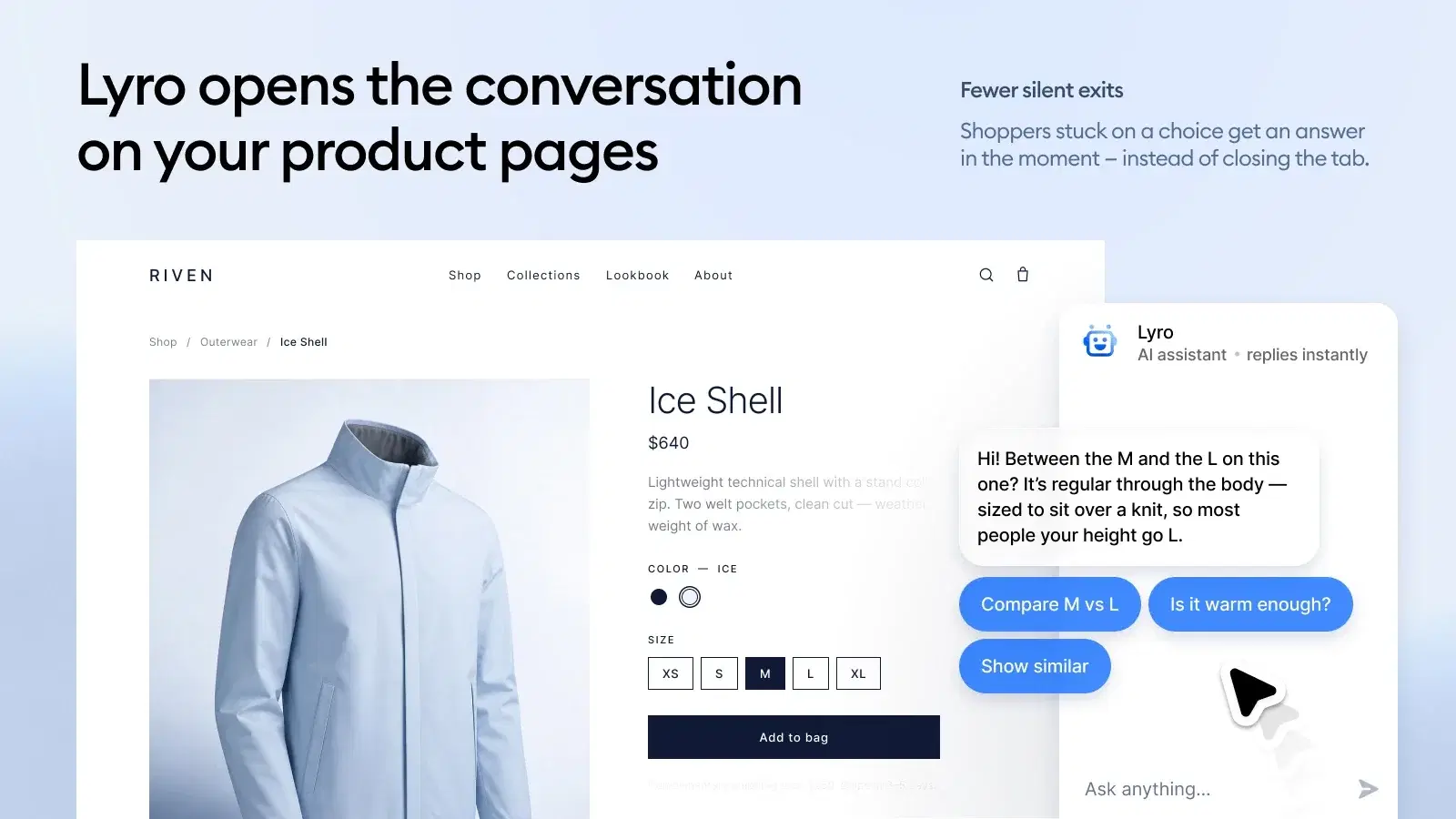
The handoff is part of the storefront experience
Tidio’s official gallery shows a product answer beside live catalogue context, followed by the shopper asking for a person. That last line is the useful test: a polished assistant still needs a clean route to accountable human help.
WHAT TO NOTICEInspect the complete transferred thread, the product and order context retained, and the message shown when no colleague is available.
Official image: Tidio / Shopify App Store ↗Do not let a tidy interface hide untidy answers
An assistant can look completely at home and still recommend the wrong product. Good design includes the behaviour when information is missing. It should ask a useful follow-up, explain a limit or offer a clear handoff. Confidence is not a substitute for the right size, delivery policy or compatibility information.
- Test a product that is out of stock and a variant available only in another market.
- Ask a question the catalogue cannot answer. Check whether the assistant admits the gap.
- Try the panel with keyboard navigation and a screen reader; check focus, labels, contrast and how it closes.
- Use a small phone with the keyboard open. The message input and relevant controls should remain reachable.
- Check page loading and responsiveness with the assistant enabled.
- Ask for a person, then check the context that actually reaches the team.
When to keep Shopify Inbox
Keep Inbox when your team can run it comfortably, its available agent handles the questions you want to automate, and the storefront experience meets your requirements. Fix missing product facts and configuration problems before buying around them. A specialist becomes interesting when you can name a remaining gap and show that it closes it.
The cheapest plan is not always the lowest-cost experience
Compare the subscription, usage charges, setup work and ongoing review effort for the same expected workload. Add the staff time spent correcting recommendations or repairing awkward handoffs. Do not assign an invented monetary value to “brand damage”; record concrete issues and their consequences instead.
Paying more can be sensible when it buys better fit, dependable controls or less maintenance that your store actually needs. Paying less can be sensible when a narrow assistant handles a narrow job well. The useful question is whether the complete experience earns its place, not whether the pricing page sounds premium.
Measure impact without giving the chatbot credit for every sale
Start with successful tasks: a relevant product found, a buying question answered accurately, a useful handoff completed. Then measure commercial outcomes at the appropriate level. People who choose to chat may already be more interested in buying, so their conversion rate cannot by itself establish the effect of the assistant.
- Write the hypothesis and primary outcome before the trial.
- Where traffic allows, randomly assign eligible visitors to the existing experience and the candidate. Keep product, pricing and promotion changes balanced.
- Measure conversion and contribution after returns alongside task success, latency, complaints and staff correction time.
- Keep the test running long enough for the planned sample and purchase cycle; do not stop at the first favourable day.
- If the store cannot support a reliable experiment, report observed usability and operational improvements without claiming a causal revenue lift.
The SEO and GEO connection is the information underneath
A storefront chatbot helps someone who has already arrived. Installing it does not automatically improve Google rankings or earn citations in external AI answers. The useful connection is the product knowledge it exposes: repeated questions about sizing, ingredients, compatibility, delivery or care show where the public store may be unclear.
Verify those answers and publish them on the relevant product pages, collections or guides. Keep essential buying facts in accessible page content rather than leaving them only inside a conversation. That gives shoppers a clearer store and gives search systems better source material to work with.
Build that foundation with product content for Shopify SEO and AI discovery.
Give the conversation the same care you give the rest of the storefront. Choose a useful assistant, design its place in the journey and measure what it changes. A well-dressed chat bubble is a start. A customer who can make a better decision is the point.
We study the whole buying journey.
Our work stays focused: Shopify SEO and GEO.